











Monster Cards Revision: October 9, 2026
🃏 Monster Cards are cards that drop directly from slain monsters. Their rarity matches the monster's rank and drops randomly. Having a higher drop rate bonus increases your chance of obtaining cards. All looted cards are stored directly in your Monster Compendium (default shortcut: P).
👉 Click here to view Zones with the New Cardsystem
🚀 First Steps & Development
New possibilities open up as soon as you acquire your first card. You can obtain them by defeating monsters ⚔️, extracting them from your compendium 📖, or purchasing them at the Auction House 💰.
Once you have cards, there are 2 main paths to develop your collection:
- Farm for Stats: Defeat monsters repeatedly until a card drops naturally with your desired attributes.
- Disenchant & Upgrade: Disenchant cards to earn special currency, then visit the NPC Asmial in Atlantis (Channel 1) to buy upgrade stones that modify attributes and boost stats.
When a card drops, you will see its initial attributes and numeric values. Rarity determines potential strength, but note that 🔴 Red Rarity Cards (Ancient) are unique and cannot be modified, enchanted, or disenchanted in any way.
|
🟢 Normal Monster |
🔵 Elite Monster |
🟣 Boss |
🟠 Raid Boss |
|---|---|---|---|
|
Green Rarity |
Blue Rarity |
Purple Rarity |
Orange Rarity |
🎲 Cards can roll between 1 to 4 attributes. Higher rarity cards have a significantly higher chance of dropping with the maximum possible number of attribute slots.
⚙️ Disenchanting: Farming Soul Stones
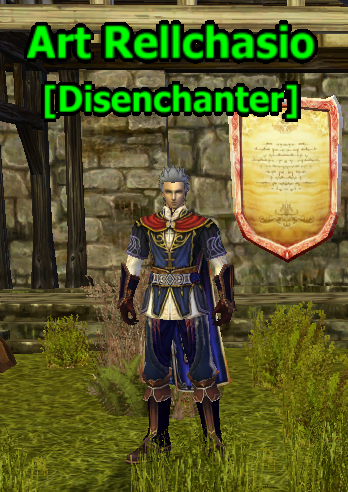
To disenchant cards, you must first learn the "Disenchanting" skill from the NPC Art Rellchasio [52.98/42.24] located in the Howling Mountains.
Find the skill in your Skill Book (shortcut: K) under the General tab. Open the Disenchanting window and right-click any card to break it down. Depending on the card's rarity, you will receive one of 4 distinct currencies:
- 🟢 Star Soul Stone: Obtained from Green cards (50 to 100 units per card; fixed 50 units for legacy cards).
- 🔵 Etheric Soul Stone: Obtained from Blue cards (Elite monsters).
- 🟣 Astral Soul Stone: Obtained from Purple cards (Bosses).
- 🟠 Elemental Soul Stone: Obtained from Orange cards (Raid Bosses).
📖 Monster Compendium Features
The Monster Compendium is your primary hub for inspecting cards, managing decks, and tracking collection progress.
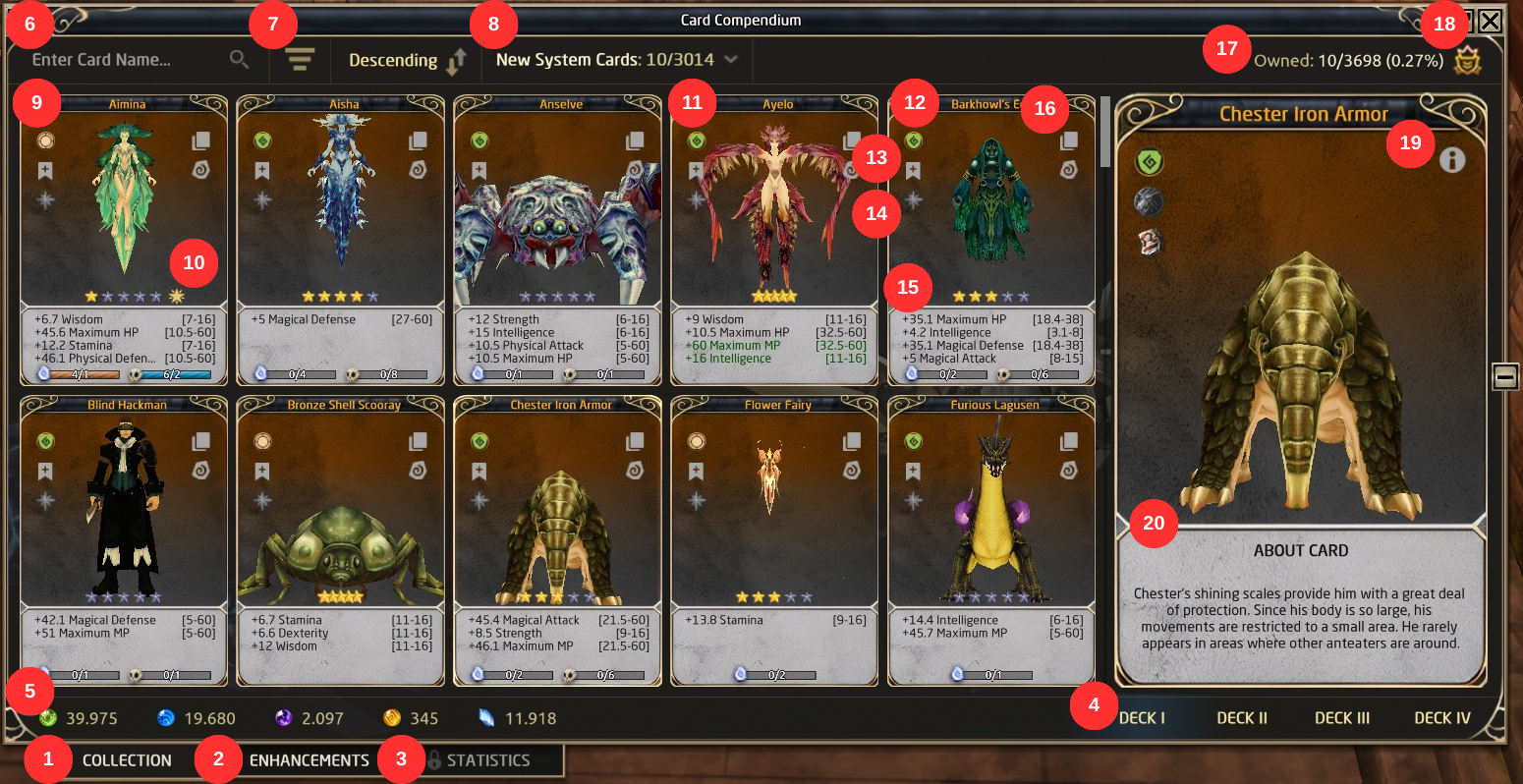
- 📚 Collection: Displays all existing cards in the game.
- ⚡ Enhancements: Allows bulk attribute transfers to cards on secondary decks.
- 📊 Statistics: Track card metrics (coming in future updates).
- 🗂️ Decks: Switch between your active card setups.
- 💎 List of Currencies: View your available soul stone totals.
- 🔍 Search Box: Quick filter by Card ID or Monster Name.
- 🔀 Sorting: Sort cards by rarity, attributes, ID, or ownership.
- 🏷️ Category Filter: Filter cards by zone, festivals, instances, etc.
- 🃏 Cards Display: Shows your cards; unowned cards appear greyed out.
- ⭐ Stars Progress: Track star levels, disenchant count, and monster kills needed to star up.
- 🌟 Maxed Card: Indicates a 5-star card that is automatically shared across all decks.
- 🏷️ Card Type: Displays classification (General, Raid Boss, Physical, Magical, Defensive, Universal, Ancient).
- ❤️ Favorites: Bookmark cards for quick retrieval.
- 💸 Boost: Pay Diamonds to maximize numerical attribute values instantly and share the card across decks.
- 📈 Card Stats: Displays active numerical attribute modifiers.
- 🎛️ Side Buttons:
- 📤 Extract Card: Remove card from compendium to trade or sell.
- 🛠️ Enhance: Open stone upgrade menu.
- 🔢 Total Cards Owned: Count of unlocked cards.
- 🐾 Card Bonus & Monster Type: View active deck bonuses and underlying monster race (e.g., Humanoid, Magical Creature).
- ℹ️ Information: Details regarding zone origin, vendor value, and IDs.
- 📜 Card Description: Short lore background for the monster.
📦 Bulk Card Enchantment
Bulk Card Enchantment lets you transfer attributes from cards in Deck I to secondary decks simultaneously.
⚠️ Requirement: Only cards with 5 Stars or cards upgraded using Diamonds are eligible.
- Click Enhancements inside the Compendium.
- Select your target attributes and payment type (Diamonds or Card Stones).
- Select cards individually or click the “>” button to batch-select up to 100 cards.
- Review total costs at the bottom and click Confirm.
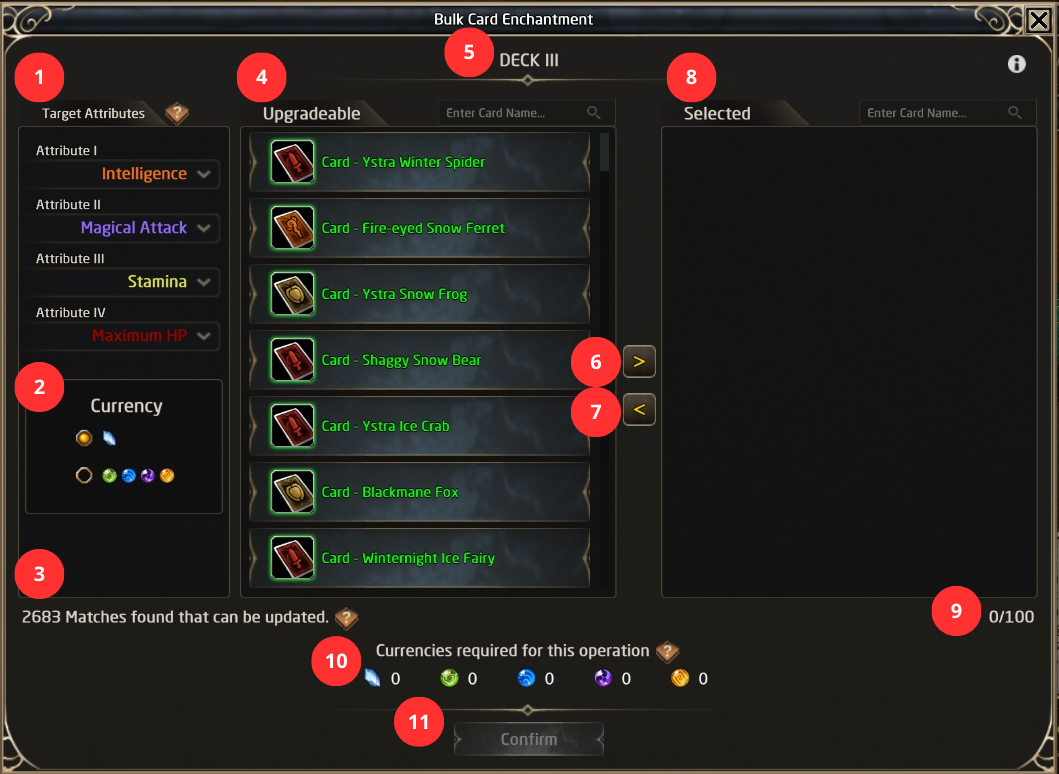
- 🎯 Target Attributes: Select the required attributes needed on your current active deck.
- 🪙 Currency: Choose the currency type you wish to spend for the operation.
- 📊 Card Counter: Displays the total count of cards meeting upgrade requirements.
- 📋 Upgradable: List of eligible cards that can be upgraded.
- 🗂️ Deck: Indicates which deck is currently being configured.
- ☑️ Select All: Batch-selects up to 100 eligible cards at once.
- ❌ Clear All Selected Cards: Resets your current card selection.
- ✔️ Selected: List of cards currently chosen for upgrading.
- 🔢 Selected Cards Counter: Counts the number of active card selections.
- 💎 Currencies Required: Shows the total cost required for the operation.
- ✅ Confirm Button: Applies the upgrades to selected cards.
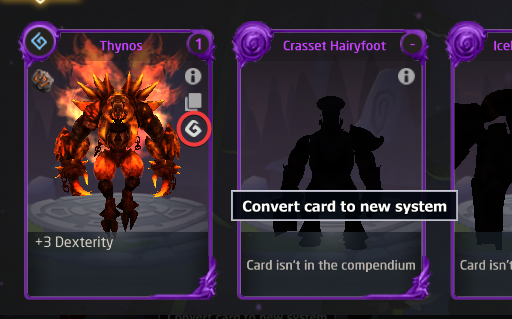
🔄 Exchange Old Cards: You can convert legacy cards into new system-compatible cards by clicking the button highlighted in the red circle in your compendium:
🏷️ Card Types & Stat Distributions
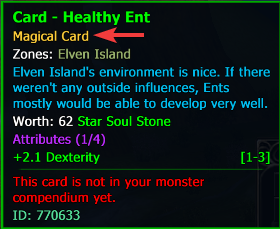
Cards belong to specific categories that determine their stat ranges and suitability for different character builds:
- 🔮 Magical: High numerical values for spellcasting classes (INT/MATK). Dropped by normal and elite monsters.
- ⚔️ Physical: High numerical values for physical combat classes (STR/DEX/PATK). Dropped by normal and elite monsters.
- 🛡️ Defensive: High numerical values for defensive and tank roles (STA/HP/PDEF/MDEF). Dropped by normal and elite monsters.
- 🌟 Universal: Features high numerical values across all attributes. Dropped by regular and raid bosses.
- ✨ Ancient: Ultra-rare cards with fixed high stats that cannot be changed using stones. Obtained from events and special bosses.
- 📜 General: Standard flexible cards customizable via enhancement stones. Found in base locations.
|
Category |
Attribute Range Potential |
||||||||||
|---|---|---|---|---|---|---|---|---|---|---|---|
|
WIS |
STA |
HP |
MP |
PDEF |
MDEF |
INT |
MATK |
STR |
DEX |
PATK |
|
|
🔮 Magical |
1-3 |
1-3 |
5-8 |
5-8 |
5-8 |
5-8 |
1-8 |
5-15 |
1-3 |
1-3 |
5-8 |
|
⚔️ Physical |
1-3 |
1-3 |
5-8 |
5-8 |
5-8 |
5-8 |
1-3 |
5-8 |
1-8 |
1-8 |
5-15 |
|
🛡️ Defensive |
1-8 |
1-8 |
5-15 |
5-15 |
5-15 |
5-15 |
1-3 |
5-8 |
1-3 |
1-3 |
5-8 |
|
🌟 Universal |
1-8 |
1-8 |
5-15 |
5-15 |
5-15 |
5-15 |
1-8 |
5-15 |
1-8 |
1-8 |
5-15 |
📈 Drop Rates (Old vs. New Zones)
🏛️ Old System Zones: Cards drop based on legacy rates and benefit from % drop bonuses as well as server-wide drop multiplier events.
✨ New System Zones: Cards drop based on fixed base rates. You can reach the maximum chance using personal % drop rate bonuses, but these do not stack with server drop rate events.
| Monster Type | Base Drop Chance | Maximum Drop Chance |
|---|---|---|
| 👾 Normal | 1% | 10% |
| 👹 Elite | 2% | 20% |
| 👑 Boss | 10% | 40% |
| 🐉 Raid Boss | 25% | 100% |
🏬 Asmial's Merchant Store (Atlas City)
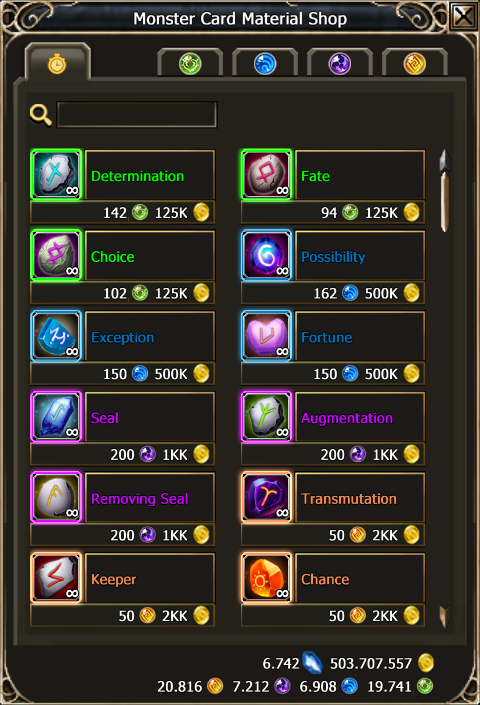
The NPC Asmial sells enhancement stones in Atlas City. His shop contains 5 tabs:
- 🆓 Free Store: Features a full assortment of stones. Prices operate on a dynamic demand system (higher server demand increases costs). Quantities are unlimited and no Diamonds are required.
- 💎 Soul Stone Tabs (Star, Etheric, Astral, Elemental): Require a one-time Diamond unlock per tab. Item prices are low but stock is limited. Reaching stock limits requires paying Diamonds per extra purchase or paying a fee to refresh tab limits. Prices in these tabs are individual and do not fluctuate based on server demand.
⭐ Stardom & Star Benefits
Improving card Stardom grants higher success chances when using enhancement stones and unlocks cross-deck sharing. Cards can reach up to 5 Stars by completing specific requirements (e.g., reading the card, defeating the monster, and disenchanting duplicate cards).
When conditions are met, perform a "Rise" upgrade using disenchanted soul stone currency or Diamonds.
|
Card Stars |
Random Stone Success |
100% Stone Bonus |
Shared Card Access |
|---|---|---|---|
|
⭐ |
Success rate x2 |
— |
— |
|
⭐⭐ |
Success rate x2 |
Main stats +0.1 to +0.2 |
— |
|
⭐⭐⭐ |
Success rate x3 |
Main stats +0.1 to +0.2 |
— |
|
⭐⭐⭐⭐ |
Success rate x3 |
Main stats +0.2 to +0.3 |
— |
|
⭐⭐⭐⭐⭐ |
Success rate x4 |
Main stats +0.3 to +0.4 |
✨ Available on any deck |
🔄 Attribute Selection on Secondary Decks
Once a card reaches 5 Stars, it unlocks across all additional decks. You must activate it by selecting its attributes, as main deck stats do not copy directly. Attributes follow a mapping table between main and secondary decks.
💎 Selection Cost: If the secondary attribute is within the main card's compatible mapping pool, changing costs 25 Diamonds. If selecting outside the pool, it costs 250 Diamonds.
🛠️ Enhancing Stones Mechanics
You can access the card enhancement menu by clicking the enhancement button in your compendium or by right-clicking an enhancement stone in your inventory.
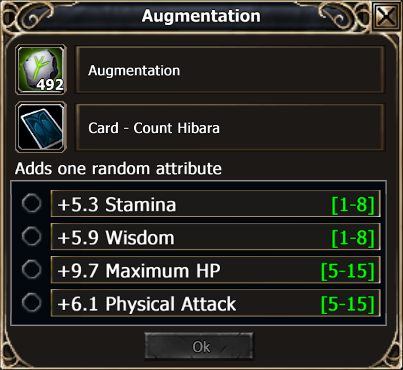
Different stones grant various modification options, including:
- Add, delete, or replace specific or random attributes.
- Modify or re-roll numerical attribute values.
- Lock specific attributes (maximum 2 locked slots) or lock the entire card against accidental changes.
- Boost main attribute values (+0.1) and extra attribute values (+0.3).
👉 Click here for the Full List of Stones & Detailed Descriptions